CLI + MCP
The upload tool for coding agents.
Give Claude Code, Codex, and other coding agents a place to upload screenshots, recordings, and reports.
Best for agents and CI jobs that need screenshots in a pull request, even where gh can't attach files (GitHub App tokens, Claude Code cloud sessions). Free to start, no bucket needed.
Stable URLs. GitHub attachments. One command.
From local file to pull request
Your agent does the work. Uploads brings the proof.
Capture as you build. Upload each milestone. Give your reviewer the before and after, right where the review happens.
Show what changed. Before and after.
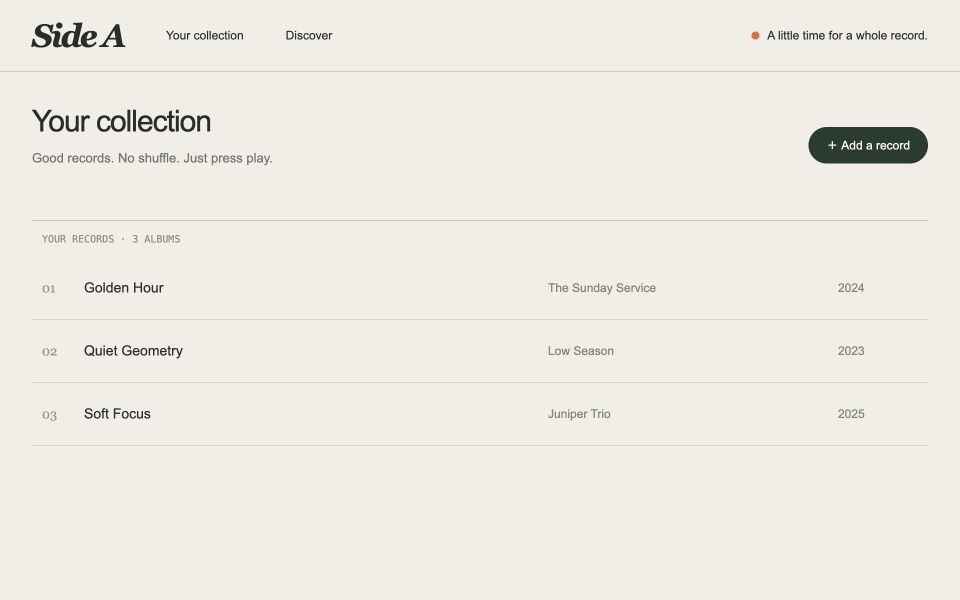
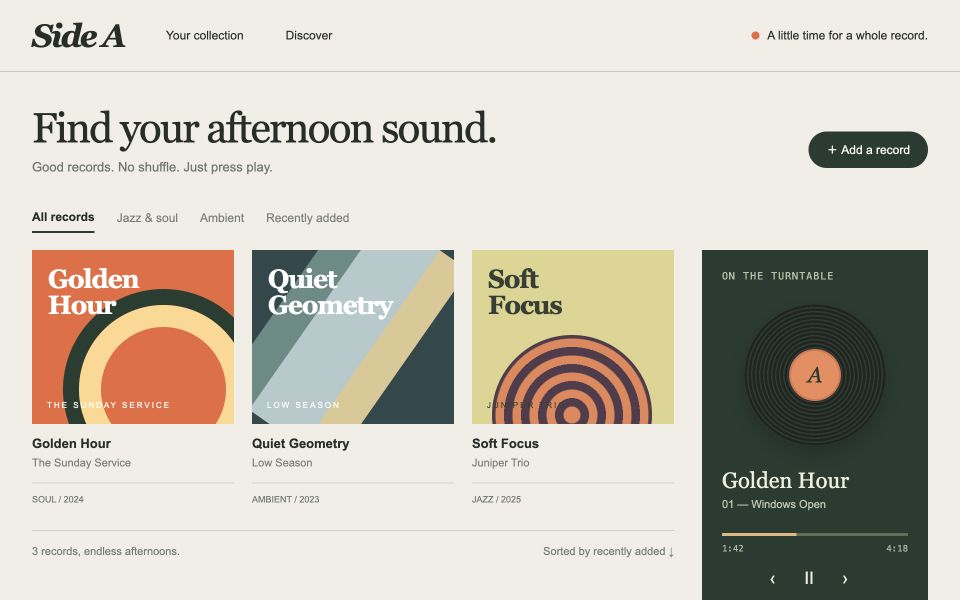
Upload each milestone. Keep building.
$ uploads put ./listening-before.png --meta path=/library --state before

$ uploads put ./listening-after.png --meta path=/library --state after
2 screenshots staged
listening-before.png✓listening-after.png✓Ready for a pull request. Stable URLs ready now.
Open the pull request. Your screenshots are there.
 uploads-shbot
Automatic posting requires the GitHub App and a linked repository. Or run uploads attach --promote.
Useful beyond the upload
“Which page was that?”
Attach a path (or anything else) with --meta, then uploads find brings it back.
# tag it on the way up (source URL, app, etc)
$uploads put ./settings.png --meta path=/account/settings
# find it again later ("Do we have any recent screenshots of settings?")
$uploads find path=/settings
gh/you/app/pull/123/settings.webp path=/account/settings
gh/you/app/pull/456/redesign.webp path=/settings
More than screenshots.
Capture and host
uploads screenshot <url> captures and hosts in one step, with local and remote browser support and optional device chrome via --frame.
Point at the change
Bake hand-drawn boxes, arrows, labels, and solid redactions into a capture with screenshot --annotate or uploads annotate — so reviewers see what changed without hunting.
Upload over MCP
The hosted MCP server at agents.uploads.sh takes files as bytes or a URL and posts them to the PR, so agents with no shell, no gh, and no filesystem can still attach. GitHub has no public API (yet) for that.
Group into a gallery
Group uploads into a gallery that can live across multiple PRs — one link for the whole set that shows linked issues and pull requests.
More file types
PDFs, logs, JSON, CSV, Markdown, and zips alongside images and video, so test reports and build output get the same stable URLs and list in the same PR comment.
Bring your own bucket
Connect your own bucket to unlock custom domains and unmetered storage — hosted storage works out of the box, your bucket is there when you want it.
Before you install
FAQ
How do I attach a screenshot to a GitHub PR from Claude Code?
Install the CLI with npm install -g @buildinternet/uploads. Sign in with uploads login, then run uploads install so Claude Code, Codex, and CI know the commands.
On your branch, run uploads put ./screenshot.png. The file gets a stable public URL immediately. When the pull request opens, staged files land in one attachments comment, and that comment updates when you upload again.
A pull request that is already open takes uploads attach ./screenshot.png. A Claude Code cloud session with no local shell uses the hosted MCP server at agents.uploads.sh.
Why does gh have no attachment upload for a GitHub App token?
People still search for “gh has no attachment upload” because GitHub has no public API for attachments.
A GitHub App token, an installation token, or a Claude Code cloud session cannot upload an attachment.
Uploads hosts the file and posts one comment on the pull request.
Does it work before the PR exists?
Yes. On any branch other than the default, uploads put and uploads screenshot stage the file for that branch. The file is hosted right away.
When a pull request opens, the uploads GitHub App promotes the staged files into the PR comment.
Without the App, run uploads attach --promote once the PR exists.
A file staged more than 30 days before the PR opens stays hosted. It does not promote on its own.
Do I need to pay, or bring my own bucket?
No. A new workspace starts on the Free plan: 250 MB of hosted storage and files up to 25 MB. That holds hundreds of screenshots, so you can start with no bucket of your own.
Pro is for a workspace that outgrows Free: 10 GB of storage and files up to 100 MB. See plans and limits.
Bring your own bucket when you want storage you already pay for. Cloudflare R2, Amazon S3, Backblaze B2, MinIO, and other S3-compatible stores all work. Storage on your bucket is unmetered.
File-size caps still apply, and Uploads stays in the path under fair-use API limits. Normal agent and CI use does not reach those limits.
Is it open source, and can I self-host it?
Yes. The CLI and the service are open source under the Apache 2.0 license. Read the source on GitHub.
Self-host from the operator runbook. A self-hosted deploy sets its own storage limits. The hosted service is free to start.
Does it work with private repos?
Yes. Install the uploads GitHub App on the private repository and it can post the attachments comment.
Anyone with the file URL can still fetch the file, including a file attached to a private repo. When the App can see that the repo is private, new attachment URLs use an unguessable prefix, so they are not derived from the repository name.
Leave secrets out of the capture, or redact them with uploads annotate.
Ready when you are
Give your agent an upload tool.
Install the CLI, sign in, and add the skills and MCP server. Or copy the setup prompt and let your agent help.
▸ paste the prompt into your coding agent — or read the full guide.